Making A Violin Playing Video With Just Your Phone

Watching the videos sent by my students of their violin playing, I’ve noticed that there seem to be some common questions.  For instance, why is the video dark?  Why is the angle pointing up so my student looks as if they’re towering over?


In this article, I thought I would look into them the best I can!  I’m no expert in photo and videography so I’ve called in an expert, Kari Watanabe, who’s taken photos for my website, for some tips. Please read on, we may have just the right solution for you!  Note this article is not about investing in extra equipment, it is about working with what you have.
 
Kari is Managing Director of Yacco Maricard Europe http://www.yaccomaricard.com/ and a photographer https://www.kari-w-photography.com/


Q1: I just have my phone to record the video with. Is this ok?

Kari’s advice:

Yes, it’s ok. The newer the device would probably be better, so find a family member/ friend with the newest device there is!

Sanae’s thoughts:
I have recorded many videos with my not-so-new iPhone and they come out sufficient. Of course, if you can invest in a plug-in microphone it may improve the audio quality, but using the phone’s internal microphone would be ok enough. In my experience, here in the UK Exam boards and local festivals mention in their guidelines that recording on a phone is fine. Also they may require you not to edit the video in any way after it’s taken, so you must capture video and audio both at the same time, and using a phone’s camera app would allow you to do that. It does depend on where you’re sending the recording to, so read the guidelines!

Q2: Why are my videos dark?

Kari’s advice:

Please record during the day, when you can have lots of natural light in the room. Have the phone placed at the source of light; best place in a home is probably at a window. Place the camera by the window, looking into the room and have the performer facing the window. Open the curtains, blinds, let the light into the room!

 
Sanae’s thoughts:
I thought I had to invest in a camera light to make my videos lighter, but even without investing in one, natural light does help!

Q3: But, I don't have a tripod... Can I hand-hold it?

Kari’s advice:

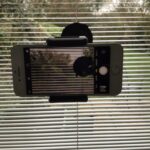
It’s better to have the phone in a stable position. You can stick the phone on the window pane itself using Blu Tack or something similar, at the right height so that the screen captures the whole of the violinist’s upper body.

 
Sanae’s experiment:
I’ve tried sticking the phone to a window using Blu Tack. This really worksl! I’ve also taken the suction cup phone holder from my car and stuck it on the window. This, also, works! I’ve also tried placing the phone on a music stand, but this was not so successful. The phone didn’t stand completely upright, and it fell on the floor a few times. Plus, if you’re using the music stand for your sheet music, you won’t have it to put the phone on…

Question 4: Should I keep the ceiling light on or off?

Kari’s advice:

If there is enough natural light, you don’t need the ceiling light.

 
Sanae’s experiment:

It looks better indeed without the ceiling light. Ceiling light seems take the focus away from what’s important. And it makes my picture yellow-ish.  I took the two pictures on the right on a cloudy morning (Hint: wait for a Sunny day!).  The top one is just the natural light with blinds open and the bottom one is with the ceiling light and blinds closed.  It looks better than the bottom, don’t you think?

3 Tips For You Again to Make a Violin Video With Just Your Phone (+Blu Tack, maybe)

1 – Choose a Sunny Day

2 – Stick Your Phone on A Window

3 – Choose the Right Height

I hope it’s been helpful!  If you have any other tips, please do send me a comment.